
How do I release a report or images early?
Operator or admin. A viewer can read the decision and should ask an operator. Releasing does not itself send a text.
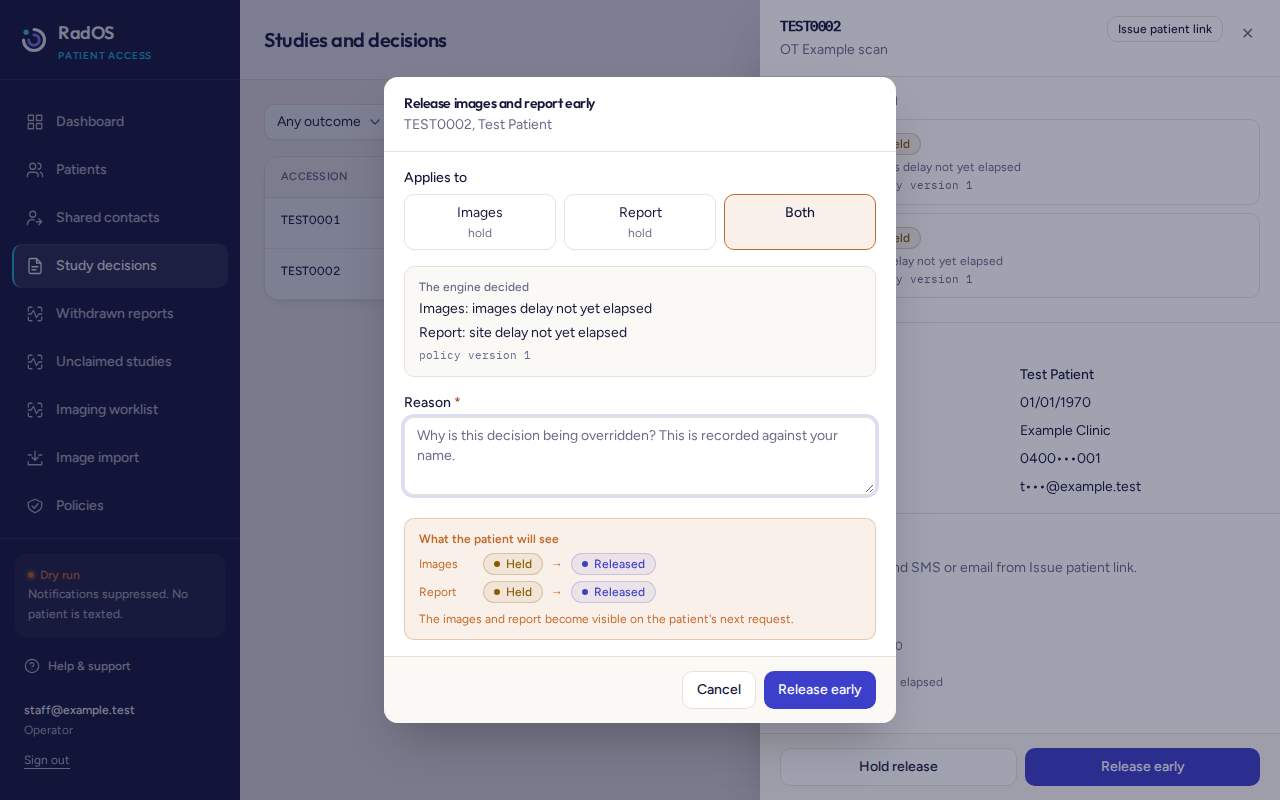
- Open the study.
- Read the current decision and the reason.
- Choose Release early.
- Choose Images, Report, or Both. They are separate. Releasing one does not release the other.
- Read "What the patient will see". It shows the outcome before and after.
- Write a reason of at least 10 characters. It is stored under your name and cannot be edited later. Do not put clinical detail in it.
- Choose Release early. The selected result is visible the next time the patient opens the portal. They are not shown your reason.
A timing hold, such as a site delay that has not finished, is the usual reason to release early. If the dialog lists a restriction, fix that restriction or leave the result hidden. Do not shorten a practice delay just to test a fault.
From VRG Hub
When Hub shows this console, use the same buttons. A Hub permission for release is still limited by your portal role and by the clinics on your login. If Hub shows its own release action instead of this dialog, it asks for a reason and refuses the same cases: a hold still in place, reports switched off, no final report, a flag, or a source that is not allowed. A timeout does not prove the release failed. Reopen the study before you try again.